Simulation
Virne offers a highly customizable simulation framework. You can define diverse network scenarios and conditions primarily through configuration files. These files grant you detailed control over both the Physical Network (PN) infrastructure and the characteristics of Virtual Network (VN) requests.
This guide outlines the key aspects you can customize.
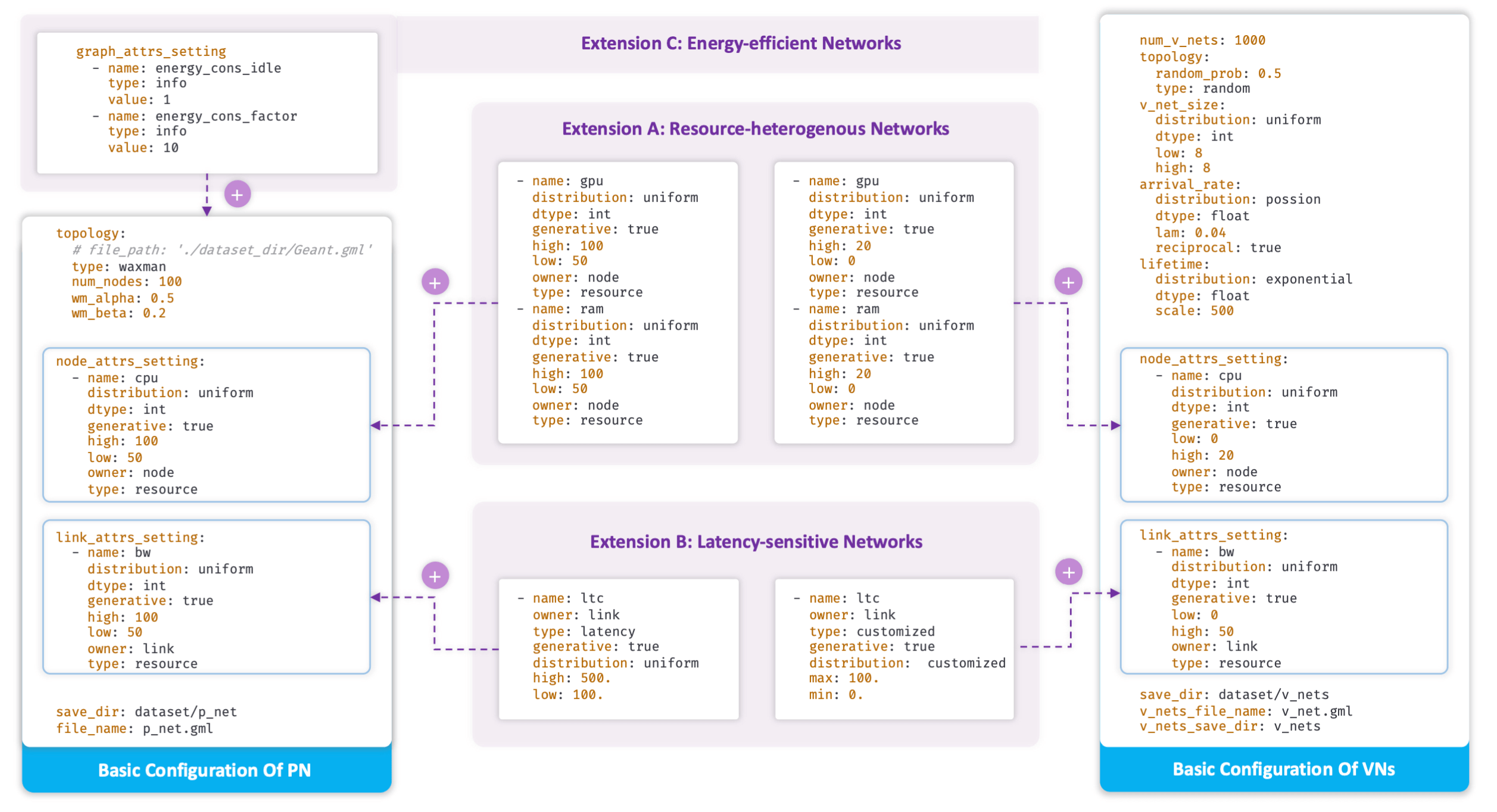
Configuration layers for PN/VN generation, network attributes, and scenario-specific extensions.
Configuration files typically manage settings for the Physical Network (PN) and parameters for generating Virtual Network (VN) requests.
1. Network Topologies
Define the structure of your physical and virtual networks.
Physical Network (PN) Topology
Generators: Use the built-in
path,star,waxman, orrandomtopology generators.Real-world Data: Virne supports realistic topologies from libraries such as SNDLib and the Internet Topology Zoo collection, available through the maintained TopoHub repository.
Specification: The PN topology is defined within its dedicated section in the configuration file.
Virtual Network (VN) Topology
Generation: Similar methods to PN topologies can be used.
Size: Configure VN size (number of nodes) often as a distribution (e.g., a uniform distribution like \(\chi_{|\mathcal{G}_{v}|}\sim\mathcal{U}(2,10)\)).
Connectivity: Set the interconnection probability of virtual nodes within a VN (e.g., 50%).
2. Resource Availability
Specify resource types and their capacities across the network.
Resource Types
Node-level: Define computing resources such as
CPU,GPU, andmemoryfor both physical and virtual nodes.Link-level: Specify network resources like
bandwidthfor physical and virtual links.
Availability and Distribution
PN Capacities: Set resource capacities for PN nodes (e.g., CPU \(\mathcal{X}_{C(n_{p})}\sim\mathcal{U}(50,100)\)) and links (e.g., bandwidth \(\mathcal{X}_{B(l_{p})}\sim\mathcal{U}(50,100)\)). These often use statistical distributions like uniform or exponential models.
VN Demands: Configure demands for VN node resources (e.g., CPU \(\chi_{C(n_{v})}\sim\mathcal{U}(0,20)\)) and link bandwidth (e.g., \(\chi_{B(l_{w})}\sim\mathcal{U}(0,50)\)) in a similar fashion.
3. Service Requirements & Scenario Extensions
Tailor simulations for advanced scenarios by specifying additional service needs. These are often configured within specific attribute settings like node_attrs_setting, link_attrs_setting, or graph_attrs_setting.
Heterogeneous Resources
Purpose: Model environments with diverse computing capabilities (e.g., CPU, GPU, and memory availability).
Configuration: Use the built-in
p_net_setting_multi_resource.yamlandv_sim_setting_multi_resource.yamlconfiguration groups as the starting point.
Latency Constraints
Importance: Crucial for time-sensitive networks (e.g., edge computing and 5G).
Configuration: Use the built-in
p_net_setting_ltc.yamlandv_sim_setting_ltc.yamlconfiguration groups, which define link attributes withowner: linkandtype: latency.
Custom Constraints
Energy, reliability, and other constraints are extension points rather than built-in configuration types. Supporting them requires a corresponding attribute implementation and solver logic; adding arbitrary YAML keys alone is not sufficient.
4. VN Request Dynamics
Configure how Virtual Network requests arrive and behave over time.
Arrival Process
Modeling: VN arrivals can be modeled using a continuous-time Poisson process, defined by an average rate (\(\lambda\) or \(\eta\)). The number of arrivals in a time window is Poisson distributed, while consecutive interarrival times are exponentially distributed with mean \(1 / \lambda\).
Adjustment: This rate may need adjustment based on the PN topology’s scale and density to ensure a reasonable load.
Configuration: Use
type: poisson,rate: <positive value>, andtime_model: continuousunderarrival_rate. Historicaldistribution: poissonandlamsettings remain supported, but are normalized to the same continuous-time process;reciprocalis deprecated and ignored.Historical Datasets: Corrected datasets use an
arrival-...-v2directory identity and never automatically reuse datasets generated with Poisson-distributed intervals. To locate an existing pre-v2 dataset for an explicit historical comparison, callget_v_nets_dataset_dir_from_setting(..., legacy=True)and load that path directly.
Lifetime
Definition: The duration for which an accepted VN remains active in the system.
Configuration: Often follows a statistical distribution, such as an exponential distribution (e.g., an average lifetime of 500 time units).
Canonical Configuration Files
The configuration files under virne/configs/ are the source of truth. In particular, refer to:
virne/configs/main.yaml for system, solver, recorder, and logging options.
virne/configs/p_net_setting/default.yaml for the default physical network.
virne/configs/v_sim_setting/default.yaml for the default virtual network request simulation.
virne/configs/p_net_setting/ and virne/configs/v_sim_setting/ for the supported scenario variants.
These files are intentionally not duplicated here so that configuration examples cannot drift from the executable defaults.